
Design loading dock camera views around handoffs
Plan loading dock cameras around freight handoffs, trailer obstructions, shipment records, and the footage needed to investigate a dispute.
Quick answer: Design loading dock camera coverage around the moment freight changes hands. Separate the view that establishes the trailer and bay from the view that shows handling at the threshold, then test both with a trailer in place. Link usable recordings to shipment records through a demonstrated search process, and avoid promising that a wide dock view will reveal small labels or concealed damage.
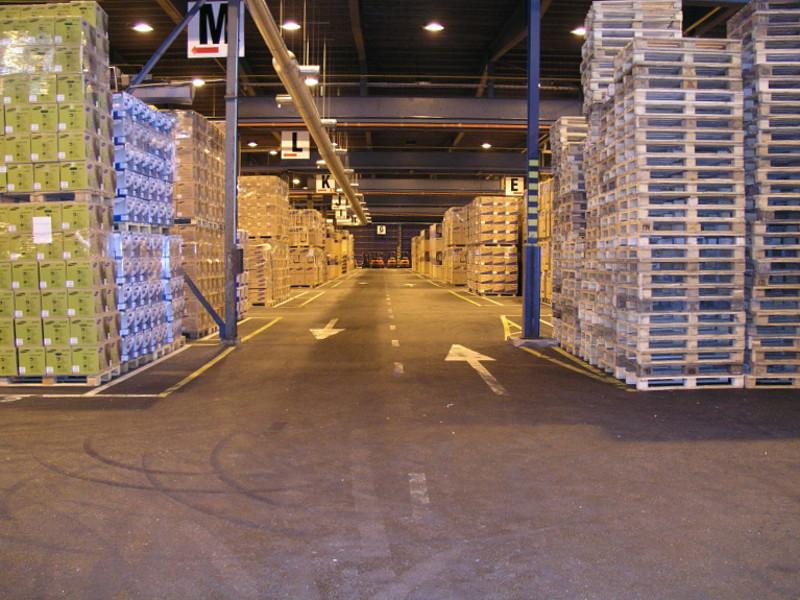
An empty dock is a generous camera test. There is no trailer blocking the yard, no forklift between the lens and the pallet, and no stack of freight hiding the threshold. A delivery changes all of those conditions before the first pallet reaches the floor.
The buying decision is therefore about the handoff, not the square footage. A business investigating a shortage needs to distinguish what the footage actually shows from what the shipment paperwork says. We would spend time testing that relationship before paying for another row of cameras with equally vague jobs.
Start with the disputed event
Choose the questions that have commercial value at this dock. Perhaps the business needs to see which trailer used a bay, whether a pallet arrived visibly damaged, or when freight moved from receiving into a staging lane. Those questions call for different viewpoints and sometimes different business records.
In a hypothetical receiving dispute, a camera may show six wrapped pallets crossing the threshold. That does not establish the number of cartons inside them, the contents of an opaque box, or whether damage existed on the unseen side. Treat those as limits of the evidence, not settings to fix later. An inspection photograph or receiving exception report may be the better source for a close detail.
Ask the receiving supervisor to describe an actual type of investigation without sharing customer records unnecessarily. Use that description to build one representative test movement. A narrow problem stated clearly is more useful than a promise to monitor everything that happens around shipping.
Divide coverage at the handoff
A bay overview can establish that a particular trailer was present while another view follows a pallet across the threshold. A staging view may then show where the pallet waited. Give these views separate jobs; overlapping pictures are useful when they preserve continuity, but redundant ceiling views can all miss the same action.
Walk the route from the yard to the first indoor destination. Notice where people or freight disappear from one image before they become visible in the next. Some gaps may be acceptable. Others may remove the only moment that distinguishes unloading from later handling. The camera installation checklist provides a place to turn those priorities into a site discussion.
Avoid assuming the image must follow every item throughout the building. That can create an expensive project with an unclear benefit. For a dock dispute, the threshold and immediate staging area may answer the question. Internal distribution belongs in a separate coverage decision if it matters to the investigation.
Put the trailer in the test
Trailer dimensions, door arrangements, seals, and dock equipment change the visible scene. The survey should include the kinds of vehicles the facility actually receives. A camera aimed successfully into one trailer may have its view blocked by another configuration or by freight loaded near the opening.
Test with ordinary operations and authorized participants, under the site's normal safety procedures. Nobody should move into vehicle paths or stand beneath equipment to improve a demonstration. The useful observation is how the system sees the approved workflow as it already occurs.
- Park a representative trailer at the selected bay and check the view before unloading begins.
- Move typical freight through the threshold at normal operating speed, including a tall or wrapped load.
- Review the period when a forklift or worker passes between the camera and the freight.
- Confirm what remains visible when adjacent bays and staging lanes are occupied.
A clear image of the first pallet is not enough if the next five are obscured by a growing stack. Review the whole sequence and identify whether the missing portion requires another angle, a different staging arrangement, or an explicitly accepted limit.
Resolve the bright yard and dark trailer
An open dock can put daylight, interior lighting, and a dark trailer in one frame. A broad view may preserve the yard while losing handling detail inside the opening. The inverse setting may show the threshold but wash out the trailer exterior. The preferred balance depends on the camera's assigned task.
Axis explains in its wide dynamic range paper that WDR approaches can create motion artifacts. That is a reason to judge moving freight in recorded footage rather than accept a feature name or a dynamic range number as proof of performance. The paper's technology discussion does not predict the result at a particular dock.
Try the combinations the building uses: open bay in daytime, receiving after dark, and the normal trailer or dock lighting. If the target is a label, use the label's real size and position. If it is visible damage, use a harmless test package with a known mark. Do not replace either task with a person holding a large sign conveniently toward the lens.
Connect video to shipment records carefully
A recording becomes easier to find when the reviewer starts with a reliable bay, time window, trailer reference, or shipment identifier. Axis describes dock activity and shipment traceability applications, including video associated with operational identifiers. Those are application possibilities, not proof that any Axis camera will automatically connect to a warehouse management system.
If an integration is proposed, ask for a demonstration using the exact software and identifier the facility uses. What happens when a shipment moves bays, a barcode is rescanned, or the business system records a later posting time? A search returning some video is less useful than a search returning the right sequence with enough context to understand it.
A manual process can also work. A receiving record with the correct bay and time may be adequate for a smaller operation. Test the time required to find a sample delivery, and retain the business reference beside the exported evidence. Do not place confidential shipment information into broadly visible camera names or overlays merely to simplify searching.
Make retention match the dispute cycle
Shipping questions may arrive after the physical movement is forgotten. Ask how long it usually takes for receiving discrepancies, carrier inquiries, or customer complaints to reach the person who can preserve footage. That operational delay should inform retention discussions alongside the company's privacy and records policies.
Do not equate a storage estimate with a guarantee that the relevant event will remain available. Recording schedules, scene activity, quality settings, equipment health, and platform behavior need review. The storage retention calculator is useful for early estimates, while actual recordings establish whether the selected configuration delivers the intended result.
Preservation should include context before and after the handoff, not only a still image of the disputed object. Have an authorized reviewer export a sample, open it on the intended review device, and confirm the bay and time are understandable. A file that only one administrator can locate has not yet solved the business problem.
Accept the footage with the receiving team
Let the person who handles delivery disputes attempt the sample investigation. Give that person the same starting information a real inquiry would provide, rather than the exact timestamp supplied by the installer. Watch for confusing bay names, missing views, or uncertainty about where the shipment moved next.
Separate installation defects from workflow choices. A camera that does not record its promised view requires correction. A receiving process that never notes which of twelve identical bays handled a shipment creates a different problem. The project can address both, but the remedy and effort should be visible.
- Keep a sample clip for each accepted dock view with the representative trailer and lighting condition identified.
- Note any label, damage, or concealed-side detail the footage cannot establish.
- Confirm who may search, export, and share dock recordings.
- Define which layout changes trigger a fresh coverage check, including new staging lanes or dock equipment.
A short review after ordinary receiving resumes can catch conditions missed during a quiet demonstration. It should compare the accepted task with real operation, not become an open-ended demand for perfect visibility everywhere.
The takeaway
Loading dock evidence works best when the camera layout follows the freight handoff and the review process follows the shipment record. A useful overview establishes context; a properly tested detail view answers a narrower question. Neither can reveal what a trailer, forklift, or opaque package hides.
For a nationwide rollout, keep the investigation questions consistent while allowing the physical layout to vary by building. Test representative trailers and busy staging conditions at each site. The result should be footage that helps resolve a defined dispute, with its limits understood before someone depends on it.
Discuss your receiving area
BlueHouse Telecom can help scope security camera installation for loading docks and warehouse sites nationwide. Bring a bay layout and the handoff questions your team needs the recordings to answer.
FAQ
Can one camera cover an entire loading dock? It may provide a useful overview, but a wide view does not automatically capture labels, visible package condition, or actions obscured by trailers. Define the required evidence before deciding how many views are needed.
Will cameras prove how many items were inside a wrapped pallet? Usually the recording can only establish what was visible. Package counts inside wrapping may require other receiving records or a separately designed inspection process. Do not infer hidden contents from an overview image.
Does an Axis camera automatically search video by shipment number? No. Shipment-based search depends on the selected software, data connection, configuration, and workflow. Ask for a demonstration using the actual warehouse system and representative exceptions before including that capability in acceptance.
When should dock coverage be checked again? Recheck after changes to staging, trailers, lighting, doors, or equipment that affect the camera's task. A periodic sample investigation can also reveal whether the footage remains searchable and useful under current operations.