
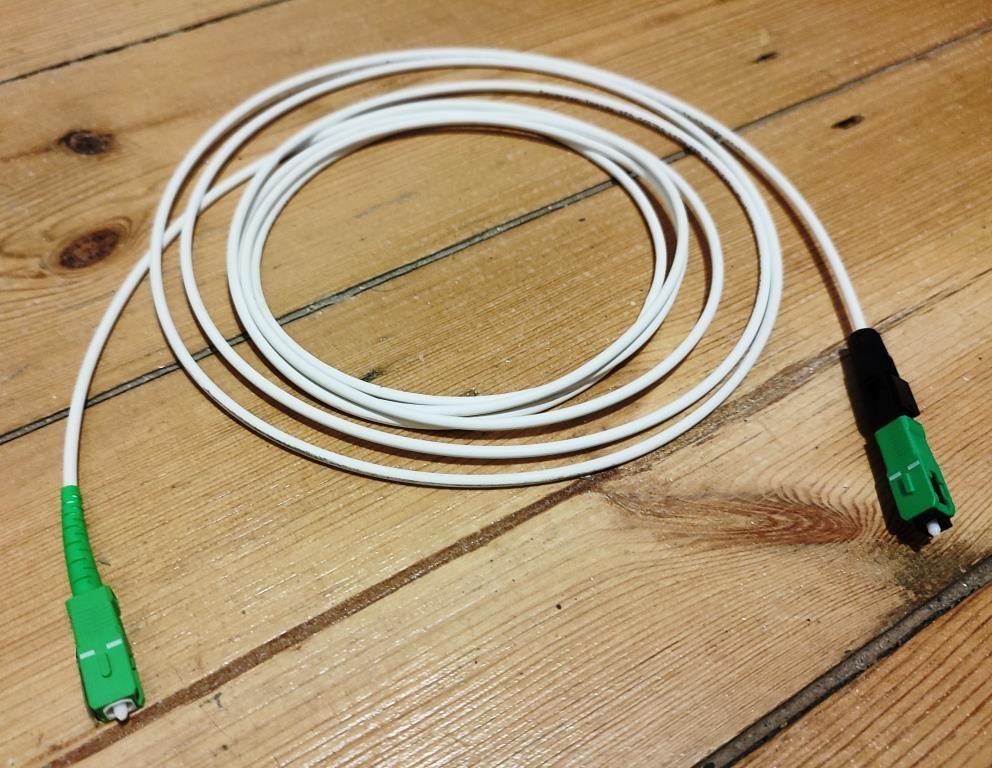
APC and UPC connectors: prevent a costly fiber mismatch
Specify connector polish at every mating point, order the right patch cords, and make testing arrangements explicit before fiber installation.
Quick answer: APC and UPC describe different fiber connector endface finishes, and they must not be directly mated. Specify both the connector format and polish at every connection, including test cords and equipment ports. Use exact part numbers and approved drawings to confirm compatibility; color is a useful clue, not a complete purchasing specification.
A replacement patch cord can look plausible, fit the rack layout, and still be wrong for the interface. This is especially easy to miss when a business has carrier equipment, building cabling, and network switches from different projects in the same room. The label fiber patch cable does not distinguish the parts that need to match.
The practical objective is to prevent an incorrect mating connection before somebody tries it. A clear port schedule, a complete order description, and a controlled replacement process accomplish more than asking an office manager to recognize every connector by sight. The same information also helps the testing team arrive with the correct accessories.
Understand the difference that matters at the connection
APC means angled physical contact; UPC means ultra physical contact. Belden's comparison describes an angled APC endface and a curved, non-angled UPC endface. It also distinguishes insertion loss, concerning optical power lost through the path, from return loss, concerning reflected light. These are different characteristics, so a general claim that one polish is faster is not a useful selection rule.
The application and equipment determine the required interface. Do not replace an approved UPC connection with APC because a product description presents APC as a higher-performance choice. The mating surfaces still need to be compatible, and the rest of the optical system must support the intended arrangement.
Keep the explanation used for purchasing simple: the connector name has more than one part, and each part matters. A request for an SC connector does not answer whether its polish is APC or UPC. Likewise, specifying APC does not answer whether the equipment takes SC, LC, or another format.
Inspect the documentation before touching an uncertain port
Begin with the equipment model, its optical interface specification, and the panel or assembly part number. Ask the responsible technician to reconcile these records with the installed equipment. If a label is missing or contradictory, stop the proposed change long enough to identify the interface properly.
Green and blue housings are familiar clues in single-mode installations, but do not make an order depend on color alone. The jacket, boot, dust cap, and connector housing are different objects, and a casual photograph may emphasize the wrong one. A purchasing employee should be able to use a verified part number rather than infer compatibility from a small image.
For a hypothetical leased office, a green connector may appear beside a carrier device while blue connectors serve a customer-owned panel. Record which component belongs to which service and who can authorize work on it. Proximity in a cabinet does not establish that the cords are interchangeable or that the business should change the provider's connection.
Write each patch cord as two specified ends
A patch cord connects two particular interfaces. Record the end-A connector format and polish, end-B connector format and polish, fiber category, length, and any construction requirements. Corning's assembly portfolio includes SC UPC, SC APC, LC UPC, and LC APC. That variety is why a broad connector-family name is insufficient for procurement.
A properly specified hybrid cord can have different finishes at its two ends, with each end mating to its corresponding compatible interface. That is different from pressing an APC endface directly against a UPC endface at one connection. Have the designer approve the complete arrangement and identify which end belongs at which location.
Order spare cords using the same level of detail. Keep the original packaging information or another durable identifier with the spare inventory. If two different cords are stored together, distinguish them clearly enough that a person handling an urgent replacement does not choose by length and color while overlooking the interface requirement.
Avoid adapter chains that hide the actual mismatch
An adapter housing is not proof that two connector endfaces should meet. Fluke Networks warns that directly mating APC and UPC can cause poor performance and damage. The correct response to an uncertain connection is identification and review, not trying a collection of adapters until the parts appear to fit.
Map the connection through the adapter to the component on the other side. The review needs to identify both mating endfaces, not merely the visible front connector. A panel can conceal a pigtail or another assembly, so the front photograph and the rear termination record should agree.
Where an approved transition is needed, document it as part of the channel and include it in the acceptance plan. Avoid leaving an improvised adapter chain in place without updating the drawing. Even if the link appears operational, an undocumented arrangement makes later testing, cleaning, and replacement harder to perform consistently.
Include the testing accessories in the work scope
The test instrument, reference cords, adapters, and inspection accessories must suit the installed interfaces. Fluke's APC testing guidance illustrates that instrument ports and inspection tips can have specific requirements. Use the current instructions for the actual instrument and configuration instead of copying a generic test setup from another job.
Ask the testing team to confirm its approach before arrival. The quote should say which installed boundaries will be measured, how the reference setup will be established, and what identifiers will appear in the results. Do not let an unexpected connector type at the panel turn acceptance into an informal check that omits part of the agreed scope.
The fiber testing acceptance guide explains the records a business can request. For this particular issue, make sure the final report and installation record identify the actual connectivity. A test file tied to the wrong strand, wrong endpoint, or incomplete channel boundary cannot settle whether the installed arrangement meets its approved requirements.
Control replacements and investigate suspected mismatches
Make a short verification step part of planned patching work. It should be usable during an ordinary service visit without requiring the team to reconstruct the original project. Keep the relevant drawing and component schedule available to the person performing the change.
Before an approved replacement, confirm:
- The link identifier and equipment or panel port being changed.
- The connector format and polish on both sides of each mating connection.
- The replacement cord's full specification and intended orientation.
- The inspection and cleaning method appropriate to the components.
- The acceptance check and record update required after the change.
If an incorrect mating connection is suspected, do not repeatedly reconnect it to see whether the symptom changes. Have a qualified technician inspect the affected components using the appropriate procedures and determine the next step. Preserve the part numbers and observed condition. A new patch cord alone may not resolve damage at another component, so the investigation should address the actual mating pair.
Hand over a connector record that the next person can use
Include connector details in the final port schedule and material list. Link each installed cord to the equipment or panel it serves, and preserve approved alternatives if the design allows them. Identify any provider-owned interfaces separately so the business knows which changes require provider coordination.
Add a simple stock record for replacement cords and inspection accessories. Note the storage location and reorder reference. A spare described only as green fiber is not a reliable maintenance item, particularly in a business supporting several buildings or different generations of equipment.
For multiple sites, use a consistent record format while preserving local differences. An acquisition or carrier change can introduce another interface without changing the company's preferred cabinet layout. Review the actual site before standardizing replacement stock. The fiber installation and internet service guide can help distinguish internal cabling work from a provider's service responsibilities when ownership is unclear.
The takeaway
APC and UPC selection belongs in the connection specification, not in an improvised decision at the rack. Identify both mating surfaces, order each cord with two fully described ends, and include the proper testing and inspection arrangements. A compatible housing shape does not override the endface requirement.
Preserve that detail after installation through labels, port schedules, and controlled spare stock. It reduces the chance that a routine replacement creates a new fault and gives the next technician a reliable starting point when an optical connection needs attention.
Prepare the details for your fiber project
BlueHouse Telecom helps businesses nationwide scope fiber installation work. Share the endpoint equipment, existing panel information, and proposed connection changes for a practical review.
FAQ
Can APC and UPC connectors be directly connected together? They should not be directly mated. Their endfaces differ, and an attempted mismatch can impair performance or damage components. Verify the intended mating interfaces before connecting them.
Does a green cable prove the connector is APC? No. Confirm the connector housing, labeling, part number, and equipment documentation. A jacket or dust-cap color is not a complete specification for the connection.
Can one patch cord have APC at one end and UPC at the other? An approved hybrid cord can serve different interfaces when each end mates to its correct counterpart. This does not make direct APC-to-UPC endface mating acceptable.
Should we replace all UPC connections with APC? No. Follow the application and equipment requirements. Review the complete optical arrangement and acceptance criteria before making any change to the installed connectivity.